Repairing a design systemand making it AI-ready.

Repairing a design system and making it AI-ready.
From Figma page to production code

Repairing a design system and making it AI-ready.
From Figma page to production code

NDA note for the case page: "This work was done under NDA. The product, client and real screens are not shown — every example below uses a fictional demo product."

Problem

A design system that worked against the team.

The product ran on a design system built on an open-source component library with separate light and dark themes. Over time, it stopped being used the way it was built.

1. Colour roles were mixed across themes.

Designers picked colours from the dark theme while designing light screens, and the dark theme itself wasn't considered at all. Every new screen made the mix worse, and made a future dark mode harder.

2. Components had no usage rules.

Nothing said which variant to use where, or what never to use. Each designer made their own choices.

3. Handoff was slow and lossy.

Pages arrived without behaviour or context, so engineers rebuilt them by eye — and copied the colour mistakes into code.

The obvious answer was to buy a new design system.

But a new library wouldn't fix the real problem: nobody had written down how the system should be used. The question became: how do we make the existing system correct, and make every page self-explanatory to developers and to the AI tools they build with?

About

Instead of replacing a broken design system, we repaired it — then made every component and every page self-describing, so engineers could turn Figma pages into on-system production code with Claude Code, fast.

Problem

A design system that worked against the team.

The product ran on a design system built on an open-source component library with separate light and dark themes. Over time, it stopped being used the way it was built.

A design system that worked against the team.

The product ran on a design system built on an open-source component library with separate light and dark themes. Over time, it stopped being used the way it was built.

1. Colour roles were mixed across themes.

Designers picked colours from the dark theme while designing light screens, and the dark theme itself wasn't considered at all. Every new screen made the mix worse, and made a future dark mode harder.

2. Components had no usage rules.

Nothing said which variant to use where, or what never to use. Each designer made their own choices.

3. Handoff was slow and lossy.

Pages arrived without behaviour or context, so engineers rebuilt them by eye — and copied the colour mistakes into code.

The obvious answer was to buy a new design system.

But a new library wouldn't fix the real problem: nobody had written down how the system should be used. The question became: how do we make the existing system correct, and make every page self-explanatory to developers and to the AI tools they build with?

The obvious answer was to buy a new design system.

But a new library wouldn't fix the real problem: nobody had written down how the system should be used. The question became: how do we make the existing system correct, and make every page self-explanatory to developers and to the AI tools they build with?

The workflow

The workflow

The workflow

Repair the system once, then every page flows to code

The design system is repaired and documented once; after that, every page follows the same path — built as a component, described, wrapped in a handoff frame and turned into code with Claude Code, with the system's rules travelling all the way.

Key decisions

Key decisions

Key decisions

1️⃣

Repair the system instead of replacing it

We seriously considered buying a new design system. I argued for fixing the one we had.

  • Why: the library itself wasn't the problem, how it was used was. A new system would arrive with the same missing rules, and engineering would have to migrate the whole codebase.

  • Trade-off: a slower, less glamorous clean-up up front, and the discipline to finish it.

2️⃣ 

Fix colour roles theme by theme

I audited where every colour was used and mapped each one back to the correct theme token: light screens use only light-theme roles, and every role has its dark-theme counterpart.

  • Why: without this, every new page kept copying the mistake into Figma and into code.

  • Result: the light theme became consistent, and dark mode became possible instead of a rewrite.

3️⃣

Make every component self-describing

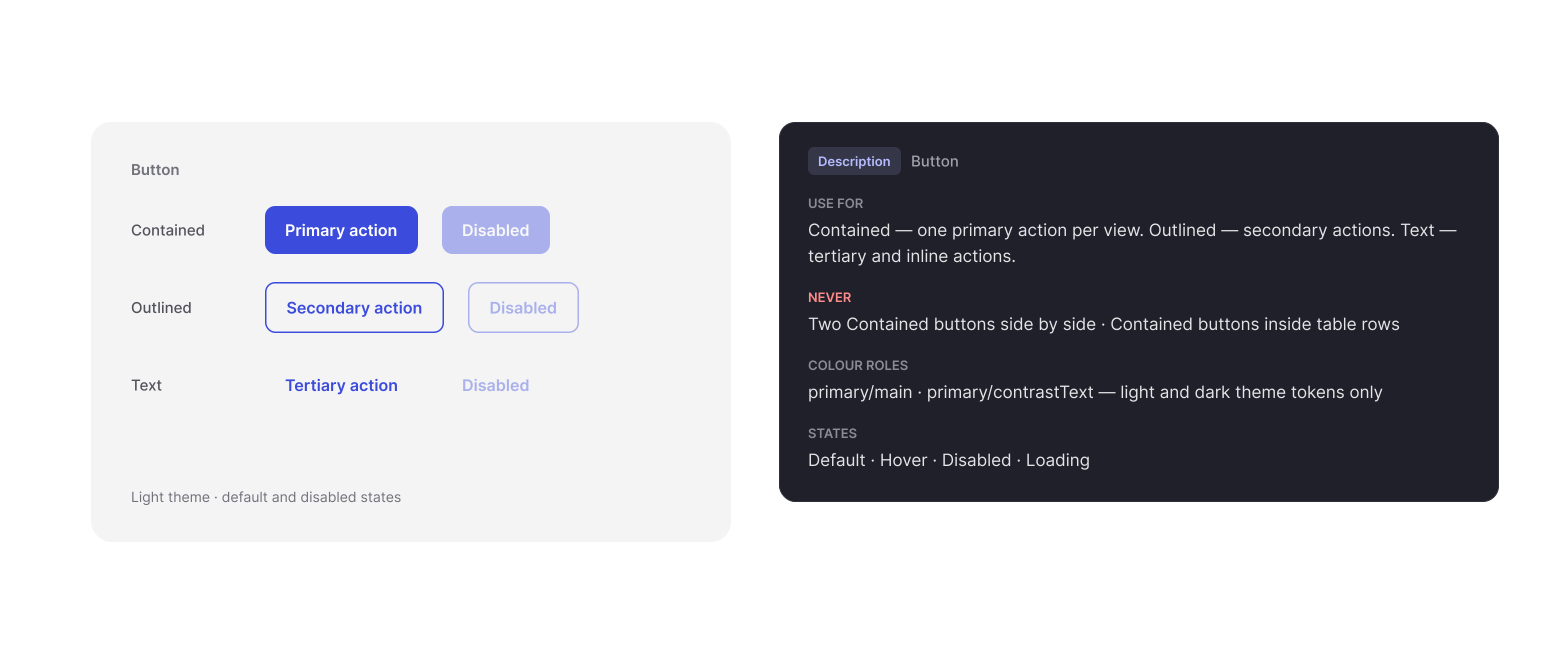
Each component got a description inside Figma: when to use it, which variants exist, which ones never to use, and which colour roles it takes.

  • Why: the rules now live exactly where designers pick component and where an AI tool reads them.

  • Trade-off: descriptions are part of the system now; every change to a component includes updating its description.
5️⃣

Turn pages into components, with behaviour attached

Every page is assembled in Figma, turned into a component, and given a description of what happens on it: what brings the user here, the primary action, cancel, errors and empty or loading states. The page component is then wrapped in a handoff frame.

  • Why: a developer receives layout, behaviour and system rules as one package — and Claude Code can read all of it at once.

  • Result: engineers paste the package into Claude Code and build the page about 30–50% faster, by the team's estimate.


Every page is assembled in Figma, turned into a component, and given a description of what happens on it: what brings the user here, the primary action, cancel, errors and empty or loading states. The page component is then wrapped in a handoff frame.

  • Why: a developer receives layout, behaviour and system rules as one package — and Claude Code can read all of it at once.

  • Result: engineers paste the package into Claude Code and build the page about 30–50% faster, by the team's estimate.

Every page is assembled in Figma, turned into a component, and given a description of what happens on it: what brings the user here, the primary action, cancel, errors and empty or loading states. The page component is then wrapped in a handoff frame.

  • Why: a developer receives layout, behaviour and system rules as one package — and Claude Code can read all of it at once.

  • Result: engineers paste the package into Claude Code and build the page about 30–50% faster, by the team's estimate.


5️⃣

Standardise the package with an AI skill

To keep every handoff consistent, I built a Claude skill that produces the same package for each frame: a structured name, the annotation, component notes and a ready-to-run prompt for Claude Code.

Before returning anything it runs a checklist and flags any rule break as a design note.

  • Why: consistency doesn't depend on who documents the page.

  • Trade-off: the designer still owns the judgement, the AI drafts, I review every package before handoff.

To keep every handoff consistent, I built a Claude skill that produces the same package for each frame: a structured name, the annotation, component notes and a ready-to-run prompt for Claude Code.

Before returning anything it runs a checklist and flags any rule break as a design note.

  • Why: consistency doesn't depend on who documents the page.

  • Trade-off: the designer still owns the judgement, the AI drafts, I review every package before handoff.

Anyone: a developer, a reviewer or an AI tool, can read the flow, the step, the surface and the state from the name alone. Annotations link screens by name: previous → this → next.

Anyone: a developer, a reviewer or an AI tool, can read the flow, the step, the surface and the state from the name alone. Annotations link screens by name: previous → this → next.

Outcomes

Outcomes

Outcomes

Consistent handoff: every page ships as a described component in a handoff frame, in the same format. The light theme is consistent again, and the dark theme is complete and in use.

Consistent handoff: every page ships as a described component in a handoff frame, in the same format. The light theme is consistent again, and the dark theme is complete and in use.

  • Fewer questions: engineers rarely need to ask how a page behaves — the component and page descriptions answer it.

  • Fewer review fixes: pages match the design and the system more closely on the first build.

  • Faster delivery: pages are built about 30–50% faster, by the team's estimate.

  • Reusable: the method transfers to any product with a design system — only the rules file changes.

Reflection

Reflection

Reflection

AI didn't replace the handoff conversation — it moved it earlier. Writing the rules down precisely enough for an AI to follow forced me to make implicit design decisions explicit, and that made the system better for humans too.

Next, I'd [connect the workflow directly to Figma so annotations are generated in the file, and track how many review fixes it prevents — або твій реальний наступний крок]