Repairing a design systemand making it AI-ready.

Repairing a design system and making it AI-ready.
From Figma page to production code

Repairing a design system and making it AI-ready.
From Figma page to production code

This work is under NDA. The client, the product and real screens aren’t shown. Every example uses a fictional product, Teamspace.

What was broken

Three things, and they made each other worse.

Three things, and they made each other worse.

  1. Colours.

The system had separate light and dark themes, but designers picked colours from the dark one while building light screens. Every new screen pushed a working dark mode further away.

2. Rules.

Components had no usage notes. Which button goes where, which variant never goes in a table: all of it lived in people's heads, so everyone decided differently.

3. Handoff.

Pages reached developers without behaviour. They rebuilt them by eye and copied the colour mistakes into code.

The obvious answer was to buy a new design system.

But a new library wouldn't fix the real problem: nobody had written down how the system should be used. The question became: how do we make the existing system correct, and make every page self-explanatory to developers and to the AI tools they build with?

About

The team was ready to buy a new design system. I suggested fixing the one we had first.

The library wasn't the problem. The way we used it was. Light screens were built with colours from the dark theme, nobody was designing for the dark theme at all, and no component said when it should or shouldn't be used. A new library would have arrived with exactly the same gaps.

So I repaired the system, wrote the rules into every component and changed how pages reach developers. Developers now paste a page's handoff package into Claude Code and, by their own estimate, build pages 30-50% faster.

What was broken

Three things, and they made each other worse.

  1. Colours.

The system had separate light and dark themes, but designers picked colours from the dark one while building light screens. Every new screen pushed a working dark mode further away.

2. Rules.

Components had no usage notes. Which button goes where, which variant never goes in a table: all of it lived in people's heads, so everyone decided differently.

3. Handoff.

Pages reached developers without behaviour. They rebuilt them by eye and copied the colour mistakes into code.

The obvious answer was to buy a new design system.

But a new library wouldn't fix the real problem: nobody had written down how the system should be used. The question became: how do we make the existing system correct, and make every page self-explanatory to developers and to the AI tools they build with?

The obvious answer was to buy a new design system.

But a new library wouldn't fix the real problem: nobody had written down how the system should be used. The question became: how do we make the existing system correct, and make every page self-explanatory to developers and to the AI tools they build with?

The workflow

The workflow

The workflow

Repair the system once, then every page flows to code

The design system is repaired and documented once. After that, every page follows the same path: built as a component, described, wrapped in a handoff frame and turned into code with Claude Code. The system’s rules travel with it all the way.

Key decisions

Key decisions

Key decisions

1️⃣

Repair the system instead of replacing it

Buying a new system was on the table. I proposed fixing ours instead.

  • Why: a new system would arrive with the same missing rules, and engineering would have to migrate the whole codebase.

  • Trade-off: a slower, less glamorous clean-up up front, and the discipline to finish it.

2️⃣ 

Fix colour roles theme by theme

I audited where every colour was used and mapped each one back to the correct theme token: light screens use only light-theme roles, and every role has its dark-theme counterpart.

  • Why: without this, every new page kept copying the mistake into Figma and into code.

  • Result: the light theme became consistent, and we finished the dark theme on the same tokens. It’s in use now.

3️⃣

Make every component self-describing

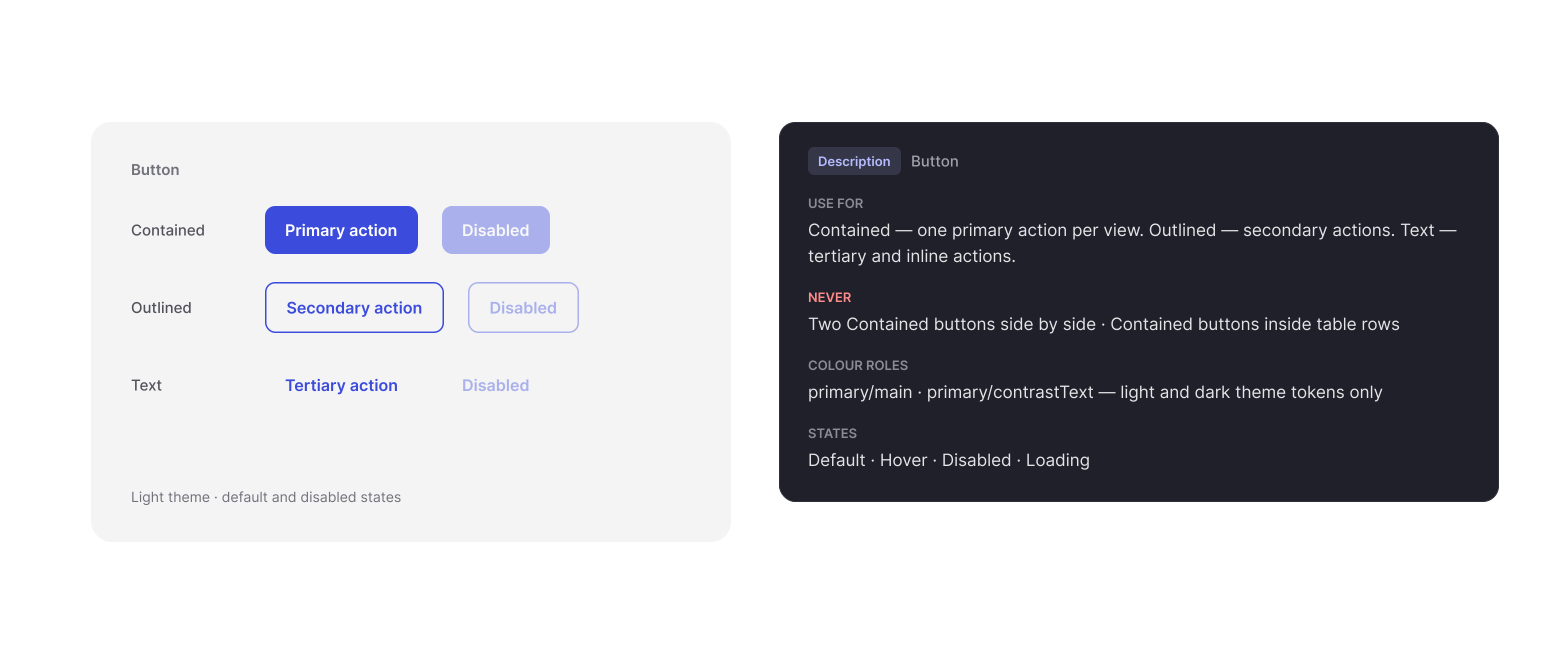
Each component got a description inside Figma: when to use it, which variants exist, which ones never to use, and which colour roles it takes.

  • Why: the rules now live exactly where designers pick components and where an AI tool reads them.

  • Trade-off: descriptions are part of the system now; every change to a component includes updating its description.
4️⃣

Turn pages into components…

Every page is assembled in Figma, turned into a component, and given a description of what happens on it: what brings the user here, the primary action, cancel, errors and empty or loading states. The page component is then wrapped in a handoff frame.

  • Why: a developer receives layout, behaviour and system rules as one package, and Claude Code can read all of it at once.

  • Result: engineers paste the package into Claude Code and build the page about 30-50% faster, by their own estimate.


Every page is assembled in Figma, turned into a component, and given a description of what happens on it: what brings the user here, the primary action, cancel, errors and empty or loading states. The page component is then wrapped in a handoff frame.

  • Why: a developer receives layout, behaviour and system rules as one package — and Claude Code can read all of it at once.

  • Result: engineers paste the package into Claude Code and build the page about 30–50% faster, by the team's estimate.

Every page is assembled in Figma, turned into a component, and given a description of what happens on it: what brings the user here, the primary action, cancel, errors and empty or loading states. The page component is then wrapped in a handoff frame.

  • Why: a developer receives layout, behaviour and system rules as one package, and Claude Code can read all of it at once.

  • Result: engineers paste the package into Claude Code and build the page about 30-50% faster, by their own estimate.


5️⃣

Standardise the package with an AI skill

To keep every handoff consistent, I built a Claude skill that produces the same package for each frame: a structured name, the annotation, component notes and a ready-to-run prompt for Claude Code.

Before returning anything it runs a checklist and flags any rule break as a design note.

  • Why: consistency doesn't depend on who documents the page.

  • Trade-off: the AI drafts, and I still review every package before handoff.

To keep every handoff consistent, I built a Claude skill that produces the same package for each frame: a structured name, the annotation, component notes and a ready-to-run prompt for Claude Code.

Before returning anything it runs a checklist and flags any rule break as a design note.

  • Why: consistency doesn't depend on who documents the page.

  • Trade-off: the AI drafts, and I still review every package before handoff.

Each handoff frame has a structured name, like InviteMember_02_Modal_Error on the demo product: flow, step, screen type, state. Anyone can tell from the name where a screen sits.

Each handoff frame has a structured name, like InviteMember_02_Modal_Error on the demo product: flow, step, screen type, state. Anyone can tell from the name where a screen sits.

Outcomes

Outcomes

Outcomes

Consistent handoff: every page ships as a described component in a handoff frame, in the same format. The light theme is consistent again, and the dark theme is complete and in use.

  • Fewer questions: engineers rarely need to ask how a page behaves. The component and page descriptions answer it.

  • Fewer review fixes: pages match the design and the system more closely on the first build.

  • Faster delivery: developers build pages about 30-50% faster, by their own estimate.

  • Reusable: the method works for any product with a design system. Only the rules file changes.

Reflection

Reflection

Reflection

Those numbers are estimates, not measurements. If I started again, I’d track build time and review fixes per page from the first week, so I could show the change instead of describing it.